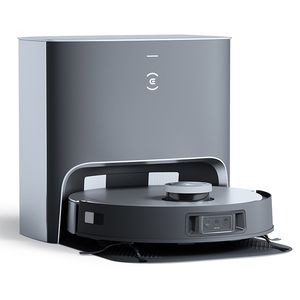
Q: Can I set virtual boundaries for the ECOVACS DEEBOT X1 Plus to restrict it from going to certain places?
Robot Vacuum: ECOVACS DEEBOT X1 Plus
A: Yes, you can specify no-go zones (restricted areas) in the app. The robot will avoid these areas while cleaning.
By michael · 3 years, 4 months ago
Other questions about the ECOVACS DEEBOT X1 Plus
- Does the ECOVACS DEEBOT X1 Plus have mapping?
- How much dirt does the ECOVACS DEEBOT X1 Plus hold?
- How long does the ECOVACS DEEBOT X1 Plus battery last on one charge?
- Does the ECOVACS DEEBOT X1 Plus have carpet boost?
- Does it have a dirt sensor?
- Does the ECOVACS DEEBOT X1 Plus have an obstacle avoidance sensor?
- Can I set no-mo zones so the ECOVACS DEEBOT X1 Plus will avoid my carpets when mopping?
- Can I schedule the robot to clean at a specific time?
- Can I set virtual boundaries for the ECOVACS DEEBOT X1 Plus to restrict it from going to certain places?
- Can I use the app to track the cleaning progress on the map in real-time?
Join our friendly community
Learn more about home robots, ask questions, share news, reviews, or create posts that you find helpful or entertaining.
Latest posts
Dreame Aqua10 Ultra vs. X60 MAX Ultra 2026
2 weeks, 4 days
0 392
Dreame X60 Max Ultra vs. Matrix10 Ultra
2 weeks, 5 days
0 392
Roborock Curv2 Flow vs. Dreame X60 Max Ultra
2 weeks, 5 days
0 255
Roborock Saros 20 vs. Saros 10R
2 months
0 2.56K
Dreame X50 Ultra vs. X60 MAX Ultra
2 months
0 2.46K
Dreame L50 Ultra vs. Aqua10 Ultra
2 months, 3 weeks
0 1.1K
Dreame Matrix10 Ultra vs. Mova Z60 Ultra Roller Complete
2 months, 3 weeks
0 745
Dreame Aqua10 Ultra vs. Mova Z60 Ultra Roller Complete
2 months, 3 weeks
0 1.57K
Dreame L50 vs. Mova Z60 Ultra Roller Complete
2 months, 3 weeks
0 911
Dreame L50 Ultra vs. Matrix10 Ultra
2 months, 4 weeks
0 933